Hey folks,
Over the past weeks, we covered the foundations of modern AI:
- Transformers - The architecture powering ChatGPT and Claude
- Embeddings - How AI represents meaning as vectors
This week: How to make AI models answer questions about YOUR specific data.
Modern LLMs like GPT-4, Claude, and Gemini know about world history, programming languages, and general knowledge. But they don't know about your company's internal documentation, your product specifications, or last week's meeting notes. RAG (Retrieval-Augmented Generation) solves this.
AI Models Don't Know Your Data (and the Obvious Fix Doesn't Work)
Large language models are trained on public internet data: books, websites, Wikipedia, code repositories. Training ended months or years ago, so they don't have access to recent information or private data.
Ask any LLM: "What's our refund policy for enterprise customers?"
Response: "I don't have access to your specific refund policies."
The model has no way to access your internal knowledge base. It doesn't know your company's policies, product documentation, recent events, or private information.
The obvious fix: Just paste your entire knowledge base into the prompt.
Here's our complete policy document (50,000 words):
[paste entire document]

Question: What's our refund policy for enterprise customers?
This fails for several reasons. Modern models support large context windows (128K-200K tokens), but processing that much is expensive and slow. You're paying 100x more to process 50,000 words than 500 words. Worse, 95% of the document is irrelevant to the query. And this approach breaks completely when you have 1,000 documents.
There's a smarter way.
How RAG Actually Works
Instead of sending everything, send only what's relevant.
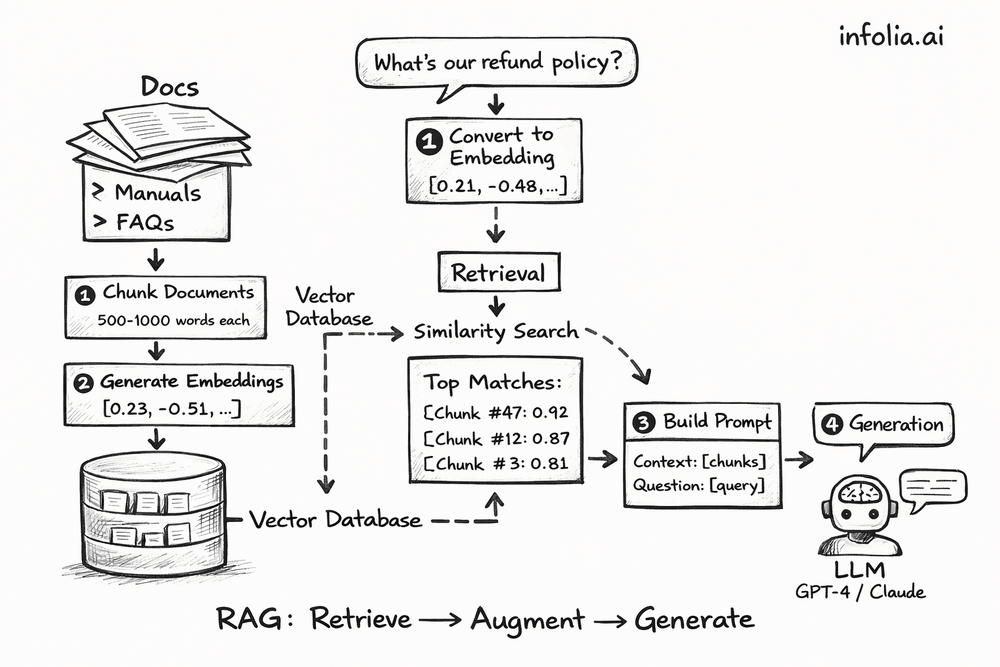
The workflow:
- Convert all your documents into embeddings, store them in a vector database
- When someone asks a question, find the most relevant chunks
- Add just those chunks to the prompt
- Let the LLM answer using that retrieved context
Same query, different approach:
User asks: "What's our refund policy for enterprise customers?"
The system converts the question to an embedding, searches the vector database for similar content, finds Section 4.2 of the Enterprise Policy doc (500 words), and sends it to the LLM with the question.
The LLM responds with an accurate answer based on YOUR policy document, not generic advice or hallucinations.
Breaking Down Each Step
Indexing (One-Time Setup)
You do this once when setting up your knowledge base:
Chunk your documents into 500-1000 word pieces. Your "Enterprise Policy Guide" becomes 20 chunks, "Product Manual" becomes 45 chunks, "FAQ Database" becomes 100 chunks.
Generate embeddings for each chunk using the same embedding models from Issue #47. Each chunk becomes a 768-dimensional vector: [0.23, -0.51, 0.87, ..., 0.42].
Store in a vector database like Pinecone, Weaviate, Chroma, or pgvector. The database indexes these embeddings for fast similarity search. You also store metadata: document name, chunk position, timestamp.
When you add new documents later, you just generate and store their embeddings. The system updates automatically.
Retrieval (Every Query)
This happens each time someone asks a question.
Take the question "What's our refund policy for enterprise customers?" and convert it to an embedding using the same model from the indexing step.
Run a similarity search in the vector database. Compare the question embedding to all stored chunk embeddings using cosine similarity (from Issue #47). Rank chunks by relevance.
Retrieve the top 3-5 chunks:
- Chunk #47 from "Enterprise Policy": similarity 0.92
- Chunk #12 from "Refund Guidelines": similarity 0.87
- Chunk #3 from "Customer FAQ": similarity 0.81
Augmentation (Building the Prompt)
Construct a prompt with the retrieved chunks:
You are a helpful assistant answering questions based on company documentation.

Context from our knowledge base:

[Chunk #47 - Enterprise Policy]
Enterprise customers are eligible for full refunds within 60 days of purchase
for any reason. Refunds are processed within 5-7 business days...

[Chunk #12 - Refund Guidelines]
For enterprise accounts exceeding $50,000 annually, extended refund windows
apply. Contact your account manager for details...

Question: What's our refund policy for enterprise customers?

Answer based only on the provided context.
Generation (Getting the Answer)
Send this to your chosen LLM (GPT-4, Claude, Gemini, etc.). The model reads the context and generates:
"Based on our enterprise policy, enterprise customers are eligible for full refunds within 60 days of purchase for any reason. Refunds are processed within 5-7 business days. For accounts exceeding $50,000 annually, extended refund windows may apply. Contact your account manager for specific details."
The LLM didn't "know" this beforehand. It read the retrieved context and synthesized an answer.
RAG vs. Fine-Tuning: When to Use Each
| Approach | Cost | Speed | Updates | Best For |
|---|---|---|---|---|
| Fine-tuning | $1,000s | Days/weeks | Hard | Specialized behavior, writing style |
| RAG | Cents per query | Instant | Add to database | Knowledge bases, documentation, recent data |
Most applications need RAG. Fine-tuning makes sense when you need the model to adopt a specific writing style or domain-specific language patterns. For everything else (customer support, internal docs, FAQs, anything that changes frequently), RAG is faster, cheaper, and easier to maintain.
Vector Databases Make This Fast
From Issue #47, you know embeddings represent text as vectors. Vector databases are optimized for similarity search across millions of these vectors.
Popular options include Pinecone (fully managed, scales automatically), Weaviate (open-source with hybrid search), Chroma (lightweight for local development), and pgvector (PostgreSQL extension if you want to use your existing database).
The core operations are simple:
# Store embeddings
vector_db.upsert(
    id="chunk_47",
    embedding=[0.23, -0.51, ...],
    metadata={"source": "enterprise_policy.pdf"}
)

# Search by similarity
results = vector_db.search(
    query_embedding=[0.21, -0.48, ...],
    top_k=5
)
These databases can search millions of embeddings in milliseconds.
Where This Gets Used
Customer support: Index help articles, retrieve relevant ones per query, generate personalized responses with citations to source material.
Internal knowledge assistants: Search across Confluence, Google Docs, Slack, and email. Employees get answers with links to original documents.
Code documentation: Know your codebase. Developers ask how to use internal APIs and get working code examples from your actual documentation.
Common Challenges
Chunking strategy matters. Too small and you lose context (a 500-word chunk might split a concept). Too large and you include irrelevant information (2000 words is usually too broad). Most people start with 500-1000 words and 100-word overlap between chunks.
Retrieval quality isn't perfect. Sometimes the question "How do I reset my password?" retrieves an article about password requirements instead of reset instructions. Hybrid search (combining vector similarity with keyword matching) helps. So does reranking: using another model to rerank the top 20 results down to the best 5.
Hallucinations can still happen. The LLM might misinterpret the context or add information that wasn't there. Being explicit helps: "Answer ONLY based on the context provided." So does requiring citations: "Quote the source for your answer."
Cost adds up at scale, but it's reasonable. Rough estimate per 1,000 queries: embeddings ($0.01 after caching), vector database ($0.05), LLM calls ($0.50-$2.00). Total around $0.50-$2.00 per thousand queries, which works for most applications.
Why RAG is Production-Ready
Unlike experimental AI approaches, RAG is built for real-world deployment.
Immediate updates. Add a new document and it's instantly searchable. No retraining, no deployment pipelines, no waiting. Your knowledge base stays current.
Transparent and auditable. See exactly which documents were retrieved for each answer. When the LLM responds, you know the source. Critical for compliance and debugging.
Scales predictably. Vector databases handle millions of embeddings. Costs scale linearly: double the queries, double the cost, but performance stays consistent.
No infrastructure overhead. No GPU clusters, no model deployment, no ML ops complexity. Just embeddings, a vector database, and API calls.
Grounded responses. The LLM answers from your documents, not training data. This reduces hallucinations and keeps responses factual.
This is why companies deploy RAG for customer support, internal knowledge bases, and documentation. It works reliably at scale.
Building a Basic RAG System
Here's a working implementation in about 50 lines:
from openai import OpenAI

client = OpenAI()

# 1. Index documents (one-time)
def index_documents(documents):
    for doc in documents:
        chunks = split_into_chunks(doc, chunk_size=1000)
        for chunk in chunks:
            embedding = client.embeddings.create(
                model="text-embedding-3-small",
                input=chunk
            )
            vector_db.store(chunk, embedding)

# 2. Query with RAG
def rag_query(question):
    # Get question embedding
    q_embedding = client.embeddings.create(
        model="text-embedding-3-small",
        input=question
    )

    # Retrieve similar chunks
    results = vector_db.search(q_embedding, top_k=3)

    # Build prompt with context
    context = "\n\n".join([r.text for r in results])
    prompt = f"Context:\n{context}\n\nQuestion: {question}"

    # Generate answer
    response = client.chat.completions.create(
        model="gpt-4",  # or gpt-4o, claude-3-5-sonnet, etc.
        messages=[{"role": "user", "content": prompt}]
    )

    return response.choices[0].message.content
That's the core of a RAG system. Index once, query as needed.
Wrapping Up
RAG combines information retrieval with language generation. Instead of hoping the LLM already knows your data (it doesn't), or cramming everything into the prompt (too expensive), you retrieve just the relevant chunks and let the LLM synthesize an answer.
The process: convert documents to embeddings (Issue #47), store them in a vector database, retrieve relevant chunks when someone asks a question, add those chunks to the prompt, generate an answer.
This works because LLMs are good at synthesizing information. They just need the right information first. RAG provides that. You get accurate answers grounded in your actual documents instead of generic responses or hallucinations.
Use it for customer support, internal knowledge bases, documentation, code assistance - anywhere you need AI to work with your private data. No model fine-tuning required. Just embeddings, vector search, and prompting. Most teams can deploy this in days, not months.
What's Next
Next week: Fine-tuning vs. Prompt Engineering - when to update model weights vs. when RAG and prompts are enough.
Read the full AI Learning series → Learn AI
How was today's email?