Hey folks,
Last week we covered RAG: how to make AI work with your private data using retrieval and embeddings.
This week: The complete spectrum of approaches for customizing LLM behavior.
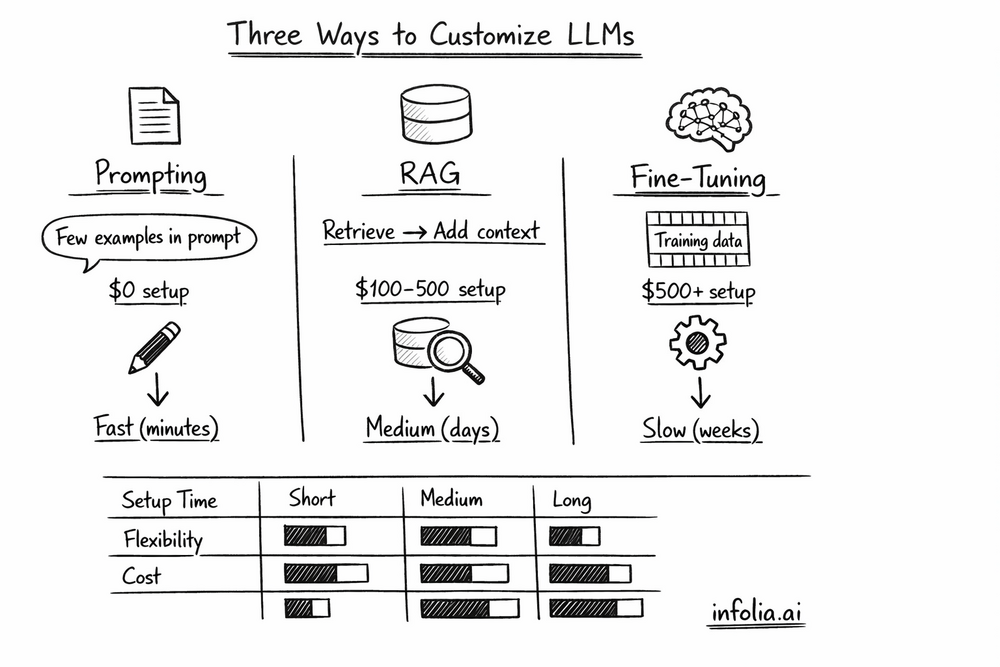
When building with LLMs, you have three core techniques at your disposal. Most developers jump straight to the complex ones without trying the simple approach first. Let's see all three in action on the same task so you understand exactly when to use each.
The Three Approaches
Prompt Engineering: Change how you ask (the input)
RAG: Add relevant context (retrieval + generation)
Fine-tuning: Update the model itself (change weights)
Each has different costs, complexity, and use cases. Let's compare them on a real task.
The Task: Extract Structured Information
Scenario: You're building a customer support system that needs to extract key information from support emails.
Sample Input:
Hi, I'm Sarah from Acme Corp (sarah@acme.com). Our API integration
is returning 500 errors when we call the /api/customers endpoint.
This started happening yesterday after we upgraded to v2.1.
Desired Output:
{
  "company": "Acme Corp",
  "contact_email": "sarah@acme.com",
  "issue": "API 500 errors on /api/customers endpoint",
  "version": "v2.1"
}
Clean, structured data you can route to the right team. Now let's see three ways to achieve this.
Approach 1: Prompt Engineering
Start here. Always. You'd be surprised how far good prompting gets you.
Zero-Shot Attempt (No Examples)
from openai import OpenAI

client = OpenAI()

prompt = """
Extract the company name, email, issue, and version from this support message.
Return as JSON.

Message: Hi, I'm Sarah from Acme Corp (sarah@acme.com)...
"""

response = client.chat.completions.create(
    model="gpt-4",
    messages=[{"role": "user", "content": prompt}]
)
Result: Works sometimes, but output format varies. Might return markdown, might miss fields, might hallucinate.
Problem: Not consistent enough for production.
Few-Shot Prompting (Add Examples)
prompt = """
Extract company name, email, issue, and version from support messages.
Return ONLY valid JSON with these exact fields: company, contact_email, issue, version.

Examples:

Input: "John from TechCo (john@techco.io). Login button not working on Safari v15."
Output: {"company": "TechCo", "contact_email": "john@techco.io", "issue": "Login button not working on Safari", "version": "v15"}

Input: "Mary at DataInc (m@datainc.com). Database queries timing out since v3.2 upgrade."
Output: {"company": "DataInc", "contact_email": "m@datainc.com", "issue": "Database queries timing out", "version": "v3.2"}

Now extract from this message:

Input: "Hi, I'm Sarah from Acme Corp (sarah@acme.com). Our API integration is returning 500 errors when we call the
/api/customers endpoint. This started happening yesterday after we upgraded to v2.1."
"""

response = client.chat.completions.create(
    model="gpt-4",
    messages=[{"role": "user", "content": prompt}],
    temperature=0  # Deterministic output
)

print(response.choices[0].message.content)
Result:
{
  "company": "Acme Corp",
  "contact_email": "sarah@acme.com",
  "issue": "API 500 errors on /api/customers endpoint",
  "version": "v2.1"
}
Perfect. Consistent format, extracts all fields correctly.
When Prompt Engineering Works
✅ The task is within the model's existing capabilities
✅ You can describe what you want clearly
✅ A few examples in the prompt are enough
✅ You need flexibility (different prompts for different cases)
Cost:
- Setup: $0 (just write better prompts)
- Per query: Same as base model ($0.01-0.10)
- 100K queries: ~$1,000-10,000
Timeline: Minutes to hours
This handles 80% of use cases. Try this first before adding complexity.
Approach 2: RAG (Retrieval-Augmented Generation)
From Issue #48, you know RAG retrieves relevant context and adds it to the prompt.
When you'd use RAG for extraction:
What if customer messages reference internal product codes, ticket IDs, or knowledge base articles?
Enhanced Input:
"Seeing error code E-2847 on checkout. Related to ticket #4523?"
Without RAG, the model doesn't know what E-2847 or ticket #4523 mean.
With RAG:
def extract_with_context(message):
    # 1. Retrieve relevant context
    error_code = extract_error_code(message)  # "E-2847"

    # Search knowledge base
    error_info = vector_db.search(f"error code {error_code}")

    # 2. Augment prompt with context
    prompt = f"""
    Context from knowledge base:
    Error E-2847: Payment gateway timeout (usually related to v3.1 integration)

    Extract structured info from this message:
    {message}
    """

    # 3. Generate with context
    response = client.chat.completions.create(
        model="gpt-4",
        messages=[{"role": "user", "content": prompt}]
    )

    return response.choices[0].message.content
Output now includes:
{
  "error_code": "E-2847",
  "error_type": "Payment gateway timeout",
  "related_ticket": "4523",
  "likely_version": "v3.1"
}
The model used retrieved context to enrich the extraction.
When RAG makes sense:
- Messages reference internal codes, IDs, products
- You need to look up related information
- Context improves extraction accuracy
Cost:
- Setup: $100-500 (vector database, indexing)
- Per query: $0.001-0.005 (retrieval + LLM)
- 100K queries: ~$100-500
See Issue #48 for complete RAG implementation.
Approach 3: Fine-Tuning
Fine-tuning updates the model's weights by training it on your specific examples.
When Fine-Tuning Makes Sense
Prompt engineering works for our extraction task. But what if:
- You need exact JSON format every single time (no variation)
- You're processing millions of messages (want faster inference)
- Your domain has very specific terminology
Then fine-tuning might help.
Training Data Format
OpenAI fine-tuning uses JSONL (one example per line):
{"messages": [{"role": "system", "content": "Extract company, email, issue, version as JSON."},
 {"role": "user", "content": "John from TechCo (john@techco.io). Login broken on Safari v15."},
{"role": "assistant", "content": "{\"company\": \"TechCo\", \"contact_email\": \"john@techco.io\", \"issue\": \"Login broken on Safari\", \"version\": \"v15\"}"}]}
{"messages": [{"role": "system", "content": "Extract company, email, issue, version as JSON."},
 {"role": "user", "content": "Mary at DataInc (m@datainc.com). Queries timing out since v3.2."},
{"role": "assistant", "content": "{\"company\": \"DataInc\", \"contact_email\": \"m@datainc.com\", \"issue\": \"Queries timing out\", \"version\": \"v3.2\"}"}]}
You'd need 100-1,000+ examples like this.
The Fine-Tuning Process
from openai import OpenAI

client = OpenAI()

# 1. Upload training file
file = client.files.create(
    file=open("training_data.jsonl", "rb"),
    purpose="fine-tune"
)

# 2. Create fine-tuning job
job = client.fine_tuning.jobs.create(
    training_file=file.id,
    model="gpt-3.5-turbo"
)

# 3. Wait for completion (hours to days)
# Check status: client.fine_tuning.jobs.retrieve(job.id)

# 4. Use fine-tuned model
response = client.chat.completions.create(
    model=job.fine_tuned_model,  # Your custom model
    messages=[
        {"role": "system", "content": "Extract structured info."},
        {"role": "user", "content": "Sarah from Acme Corp..."}
    ]
)
Fine-Tuning Results
Benefits:
- More consistent output format
- Faster inference (no need for few-shot examples in prompt)
- Can learn domain-specific patterns
Drawbacks:
- Requires 100-1,000+ quality examples
- Training takes hours to days
- Costs upfront ($50-500 for training)
- Hard to update (need to retrain)
Cost:
- Training: $50-500 (depends on data size)
- Per query: Same as base model
- 100K queries: $50-500 training + $1,000-10,000 inference
Timeline: Days to weeks (data prep + training + evaluation)
Side-by-Side Comparison
Let's compare all three on our extraction task:
| Approach | Setup Time | Accuracy | Cost (100K queries) | Flexibility | When to Use |
|---|---|---|---|---|---|
| Prompt Engineering | Minutes | 85-90% | $1,000-10,000 | High | First choice, always |
| RAG | Days | 90-95% | $100-500 + LLM | Medium | Need external knowledge |
| Fine-tuning | Weeks | 95-98% | $500 upfront + queries | Low | Need perfect consistency |
Key insight: The accuracy difference is often small, but complexity difference is huge.
The Decision Path
Here's how to choose:
Step 1: Try prompt engineering
- Few-shot prompting
- Clear instructions
- Structured output format
Works? Stop here. 80% of cases end here.
Step 2: Add RAG if needed
- Do you need to reference external data?
- Do messages contain IDs/codes that need lookup?
Yes? Add RAG (see Issue #48).
Step 3: Consider fine-tuning only if:
- Prompting + RAG aren't consistent enough
- You're processing millions of requests (speed matters)
- You have 1,000+ quality training examples
- You have ML expertise to evaluate and maintain
Most teams stop at Step 1 or 2. Fine-tuning is rarely necessary.
Real Production System: Combining All Three
Most sophisticated systems use multiple approaches together:
def handle_support_message(message):
    # 1. System prompt (prompt engineering)
    system_prompt = """
    You are a support ticket analyzer. Extract structured information
    and respond professionally.
    """

    # 2. RAG: Retrieve related tickets/docs
    similar_tickets = vector_db.search(message, top_k=3)
    context = format_context(similar_tickets)

    # 3. Optionally use fine-tuned model for consistent formatting
    model = "gpt-4"  # or your fine-tuned model

    prompt = f"""
    {context}

    Extract from this message:
    {message}
    """

    response = client.chat.completions.create(
        model=model,
        messages=[
            {"role": "system", "content": system_prompt},
            {"role": "user", "content": prompt}
        ]
    )

    return response.choices[0].message.content
This combines:
- Prompt engineering (system prompt sets behavior)
- RAG (retrieves relevant context)
- Optional fine-tuning (for format consistency)
Each technique solves a different problem. They're not mutually exclusive.
Wrapping Up
You have three tools for customizing LLM behavior:
Prompt Engineering: Start here. Free, fast, flexible. Handles most use cases.
RAG: Add when you need external knowledge. Retrieves relevant context dynamically.
Fine-tuning: Use sparingly. Only when you need perfect consistency or have very specialized needs.
The pragmatic path:
- Write better prompts (few-shot, clear instructions)
- Add RAG if you need to reference external data
- Fine-tune only if 1 and 2 aren't enough
Don't over-engineer. Start simple and add complexity only when you hit specific limitations.
Want the complete decision framework? I wrote a comprehensive guide comparing when to use RAG vs fine-tuning with decision flowcharts and real-world examples: RAG vs Fine-tuning: A Developer's Decision Framework
What's Next
Next week: Tokens & Context Windows - understanding how LLMs process text and managing length limits.
Read the full AI Learning series → Learn AI
How was today's email?